Violet Rush
- Game Overview
- Project Overview
- Core Gameplay
- Design Work
- Tools
- Design Challenges & Solutions
- Playtesting & Iteration
- Visual Development & Polish
- Demo
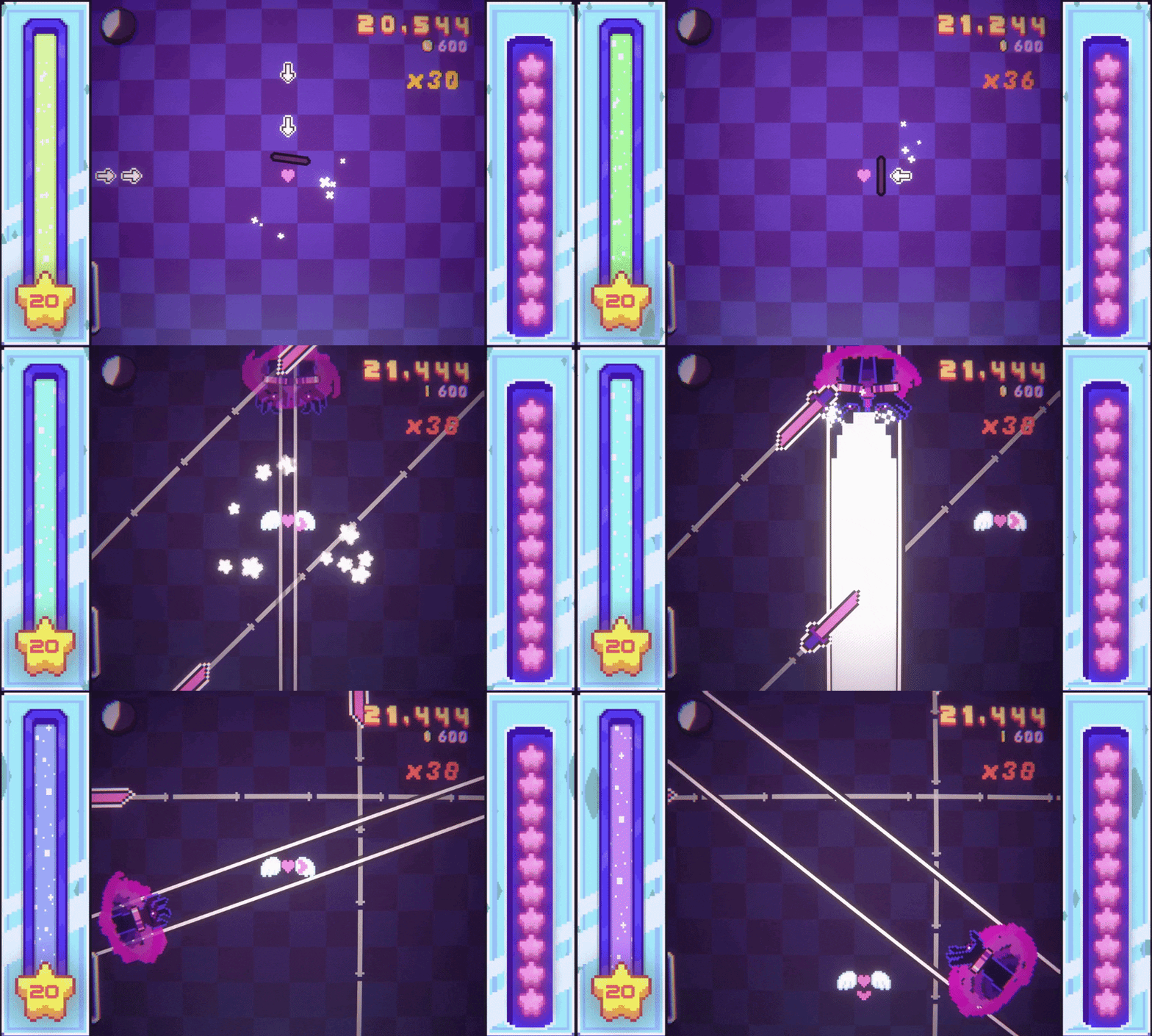
A dreamy, cozy arcade game with magical pixel art, Violet Rush is an arcade-style roguelike rhythm game where you catch arrows to the beat while surviving increasingly demanding challenges. No checkpoints. Performance is rewarded. Earn currency by overcoming each stage, purchase upgrades between levels, and discover unique combinations that change how you play.
Core Mechanics:
- Rythm-based Arrow Catching: Rotating a paddle to catch arrows mapped to different songs
- Challenge Navigation: Jumping and sometimes using other input actions to navigate obstacles/challenges
- Roguelike Progression: Collecting currency, obtaining upgrades and creating a build
Player Actions:
The player’s primary action is rotating their paddle with the W, A, S, D, or arrow keys to catch incoming arrows. Each song consits of arrow patterns and challenges, and different stages may have different input for their challenge/obstacle sections, but the primary input is to jump.
Between levels, the player has the oppurtunity to spend currency on upgrades to shape a build for the rest of the run.
The player also chooses run modifiers before starting a run, which can help you mitigate a pain point, change how you play, or even increase the difficulty.
Main Challenges:
Given the nature of the genre, the main challenge is that there are no save points.
- A “stage” in the game is comprised of multiple levels and then a boss level which introduces a new mechanic.
- Each stage also introduces a new arrow type, which contributes to an increasing level of difficulty as the player progresses.
- Challenges also escelate in diffoculty as the stage progresses.
Win/Loss Conditions:
- Since the game is a roguelike, the player has to beat the game in one attempt by completeting all of the stages.
- For each level, we also reward the player for their performance. Poor performance can result in you getting less resoruces, which can change which upgrades you choose.
Reward System:
After each level the player is presented with different reward routes that they can choose from. The player selects one option per level. The primary shop reward allows you to choose from cards that a drawn based on a weight system that tries to make sure that there is always at least one useful option availiable. As mentioned before, the player is also rewarded with currency when they complete the level. The reward is comprised of a base reward and additional rewards based on their performance for the level.
In my game, I have a variety of upgrades with different effects, from blocking damage or healing to introducing new arrow types and effects that destroy arrows.
For my upgrade system, we have three possible lifetimes
- Temporary: Upgrade should only last for the next level
- Example: A temporary discount
- Renewing:Upgrade needs to be readded at the start of each level.
- Example: Effect that should only be triggered once per level
- Permanent should last forever
- Example: Permanently altering some variable
The RuntimeModifierManager abstract class shown below is a way to store and manage the lifecycle of these 3 ways that upgrades work without having to define it for each class.
In my game, we can divide upgrades into groups based on the events they respond to. Fore example, multiple upgrades that prevent damage need to know when the player is about to take damage.
The child class of RuntimeModifierManager will typically listen to one event. When the event occurs, it will loop through each of the active modifiers and ask if they should active.
public abstract class RuntimeModifierManager<TModifier> : MonoBehaviour where TModifier :
                                                          class, IRuntimeModifier
{
    protected readonly List<RuntimeModifierEntry<TModifier>> activeModifiers = new();
    protected readonly List<RuntimeModifierEntry<TModifier>> renewingModifiers = new();
    protected readonly List<RuntimeModifierEntry<TModifier>> permanentModifiers = new();

    private bool _initialized;


    private void HandleStateChanged(GameState previousState,GameState newState)
    {
        if (newState == GameStateManager.LevelStartState)
        {
            RestoreRenewingModifiers();
        }

        if (newState == GameStateManager.LevelEndState)
        {
            RemoveTemporaryModifiers();
        }

        OnGameStateChanged(previousState, newState);

        if(newState == GameState.DeathSequence)
        {
            ClearAllModifiers();
        }
    }


    /// <summary>
    /// Adds a temporary modifier that is removed at level end.
    /// Its inventory card is also removed when it expires.
    /// </summary>
    public virtual void Register(TModifier modifier,UpgradeBase sourceUpgrade)
    {
        if (modifier == null)
            return;

        Initialize();

        RuntimeModifierEntry<TModifier> entry =
            new RuntimeModifierEntry<TModifier>(
                modifier,
                sourceUpgrade,
                removeCardWhenExpired: true
            );

        AddActiveModifier(entry);
    }

    /// <summary>
    /// Adds a modifier template that creates a fresh active modifier
    /// at the beginning of each level.
    /// Its inventory card remains between levels.
    /// </summary>
    public virtual void RegisterRenewing(TModifier modifier,UpgradeBase sourceUpgrade)
    {
        if (modifier == null)
            return;

        Initialize();

        RuntimeModifierEntry<TModifier> entry =
            new RuntimeModifierEntry<TModifier>(
                modifier,
                sourceUpgrade,
                removeCardWhenExpired: false
            );

        renewingModifiers.Add(entry);
    }

    /// <summary>
    /// Adds a modifier immediately and keeps it active between levels.
    /// Its inventory card remains.
    /// </summary>
    public virtual void RegisterPermanent(TModifier modifier,UpgradeBase sourceUpgrade = null)
    {
        if (modifier == null)
            return;

        Initialize();

        RuntimeModifierEntry<TModifier> entry =
            new RuntimeModifierEntry<TModifier>(
                modifier,
                sourceUpgrade,
                removeCardWhenExpired: false
            );

        permanentModifiers.Add(entry);
        AddActiveModifier(entry);
    }

    /// <summary>
    /// This is how the modifier actually gets added to the activeModifiers. When
    /// a modifier is activated we call its OnActivate(). Use OnActivte() as essentially
    /// a start function.
    /// </summary>
    protected virtual void AddActiveModifier(RuntimeModifierEntry<TModifier> entry)
    {
        if (entry == null || entry.Modifier == null)
            return;

        activeModifiers.Add(entry);

        OnModifierActivated(entry.Modifier);

        entry.Modifier.OnActivate();

        SortActiveModifiers();
    }

    // Renewing & removing modfiers...

    // Modifier lifecycle...

    // Cleanup and lifecycle...
}Overview
For my game, building a level editor was necessary. My process for the level editor was to implement new features as I discovered pain points when creating levels.
For example, I have developed soft pattern presets overtime through trial and error with experiementing with new patterns, that I think feel fun and interesting.
When placing arrows in a level, I often need to check surrounding arrows to check whether the patterns were in line with my soft presets, so I added a details button to be able to view all of the arrow directions above their respective marker.
Level Events
There are currently three types of level events:
- Arrow Event: The basic arrow note
- Challenge Event: A section of the song where the player swaps control mode and dodges obstacles
- Pattern Block Event: A block of fixed length that will be swapped for a random pattern from a database
Arrow events are simulated in the level editor to give immediate feedback on adding or editing arrows. This allows you to simulate patterns without having to play the level file.
Pattern blocks and challenges appear as markers on the timeline, but aren’t simulated in the editor. It would be helpful to simulate challenges and patterns within the level editor, but both of them present problems that are difficult to solve.
Core functionality
My level editor currently has the following features:
- Box Select and Multi-selecting: lets you move multiple timeline events together, which is especially useful for moving blocks of the song around when trying to position challenge events.
- Looping Tool: used to repeatedly test a short section of the song to fine-tune timing and patterns.
- Details Tool: used to view the direction for arrow events. For implementing patterns, its really helpful to be able to see the directions of surrounding arrows to avoid having to scrub back and forth.
- Add & Edit Event Tool: add arrow, challenge, or pattern blocks. Select the marker in the timeline to edit the current marker.
- Timeline Playback, Scrubbing, and Zoom: timeline playback supports playing the song’s arrow events directly in the editor without having to play the level file in the game scene. The scrubbing and the timeline zoom feature allows for percise timing adjustments and pattern editing throughout the level file.
- Undo/Redo Stack: undoing and redoing actions such as moving an event marker, or editing and adding an event. This tool lets you quickly reverse or re-apply actions which makes testing and experiementing with changes less of a pain point.
The workflow looks like for creating a new level:
- Select a level and music file: select a level file and the associated music file, then set the target bpm.
- Plan out: develop a general idea of where to place challenge sections in the song by scrubbing the music.
- Build the level timeline: work from the start to the end of the song adding arrow event markers to create patterns. While doing that, use the scrub tool and play the level section to briefly check the newly added patterns.
- Fine-tuning: go back and use the scrub, loop, and edit tool to fine-tune timing and patterns. Test changes by playing the level.
- Implement pattern blocks: find sections of the song that can be replaced by a preset pattern. This usually is during breaks in the song. Im still working on this system.
Level Editor Demsonstration:
Technical implementation
As mentioned previously, there are three types of events: each is stored on an individual line in a text file. The following is a snipit from one level file.
# Saved by Level Editor
# BPM: 90

(ARROWS EXAMPLE)
4,arrow,right,6.5,normalarrow
5,arrow,left,6.5,normalarrow
5.5,arrow,right,6.5,normalarrow
6,arrow,down,6.5,normalarrow
6.25,arrow,up,6.5,normalarrow
6.5,arrow,left,6.5,normalarrow

(CHALLENGE EXAMPLE)
34,obstacle,simplelanedodger...

(PATTERN EXAMPLE)
50,pattern,easy,2,6...The level editor reads each of the events when loading a file; for arrows, we create an editor version that can be simulated by a script controlling the editor’s song time.
Upgrade Design
I spent a lot of time figuring out how to design upgrades for the game. Initally i was struggling with which variables that upgrades influenced. At first, I wanted the primary indicator of successs to be the players score, so I was designing upgrades around increasing the players score.
Through a couple playtests, I quickly moved away from this design because the effects of upgrades didn’t feel visible, and it was very challenging to try and come up with a way in which upgrades felt impactful.
Instead I made the primary success access just how far you make it in the game, with score being a secondary axis that the player doesn’t focus on outside of trying to achieve the highest score posible for a leaderboard position.
This was my thought process for how defensive upgrades should work.
Conditional
A defensive reward should require that the player first overcome a meaningful risk.
- Defensive rewards reduce punishment: the player is allowed to make more mistakes with more health.
- If we reduce punishment before the player shows mastery, then the player isn’t required to master anything. This reduces tension and creates some balance issues by trivializing future challenges.
- By using conditions like difficulty, performance requirements, or success, we can keep the player feeling like they earned protection rather than just being granted free safety.
Capped
Defensive rewards scale with player skill because skilled players make fewer mistakes, so each unit of defense lasts longer and effectively makes them far tankier than a less skilled player. This fact emphasizes the importance of defensive rewards being capped to avoid trivializing the game.
Convertible
It is important for defensive rewards to be convertible since skilled players don’t need defensive rewards which actually hurts the game’s difficulty since defensive rewards scale so well with player skill. To avoid giving the player no reward entirely to avoid this situation, we should instead give highly skilled players an alternative reward to still give them meaningful value.
Now through actual playtesting, I found that the player was coninously struggling to survive, feeling like they didn’t have enough healing or ways to avoid damage, or none of the availible cards felt useful. So, while in theory its better to use conditions like difficulty, performance requirements, or success, its still important to present the player with options that provide immediate value, like increasing the duration of shields that prevent damage.
I’ve also been working on implementing upgrades that focus on benefiting struggling players while providing less value for more skilled players, keeping in mind the reasons above. For excample, one upgrade heals 1 health the first time your health drops below half each level. This provides additional support to players who are struggling to survive, while offering little to no benefit to players who consistently maintain higher health.
Syncing Notes
Its extremely important for a rythem game that arrows match the song time, so arrows can’t be controlled by physics, or be mapped to game time becuase frame rate issues can cause minor offsets from the music. Instead the arrows have to mapped to the audio settings DSP time, which runs on a seperate pipeline than how graphics are rendered tied to the audio, and the position has to be lerped directly. It took me a while to figure this out.
protected virtual void Update()
{
    // Get elapsed DSP time
    float elapsed = (float)MusicManager.Instance.ScaledElapsedTime;

    Vector2 targetPos;


    if (elapsed <= _arrivalTime)
    {
        // Normal movement to goal
        float t = Mathf.InverseLerp(_spawnTime, _arrivalTime, elapsed);
        targetPos = Vector2.Lerp(_startPos, _endPos, t);
    }
    else
    {
        // AFTER goal → continue to center
        float extraTime = elapsed - _arrivalTime;

        float postTravelDuration = 0.2f; // tweak this

        float t = Mathf.Clamp01(extraTime / postTravelDuration);

        targetPos = Vector2.Lerp(_endPos, Vector2.zero, t);
    }

    SmoothTranslate(targetPos);
}

protected void SmoothTranslate(Vector3 targetPos)
{
    // Smooth movement toward correct DSP position
    transform.localPosition = Vector2.Lerp(
        transform.localPosition,
        targetPos,
        1f - Mathf.Exp(-20f * Time.deltaTime)
    );
}Here is an example playtest form:
Download/View the Example Playtest PDF
One challenge that I am working through is how to balance playtest forms for the entire audience, while accounting for the differences in players’ familiarity with the game. I’m trying to figure out which questions to include for first time experiences, while keeping questions focused enough to still get meaningful feedback. Here is how I would describe the audience:
- people who haven’t played the game before
- people who have played before but didn’t play the previous playtest
- people who played the previous playtest
In addition, I feel I make more changes than I should between playtests, which is something that I could improve upon. For a while I struggled with getting people to playtest, so I had to make them less frequent with more changes.
You can download the files from Dropbox:
https://www.dropbox.com/scl/fi/mab6opvrhhm05igw88z6w/VioletRush_10-10-2026_Playtest_2.zip?rlkey=kge2v8nd1lio8bvsku9i3lc52&st=41w5hr6r&dl=0
59HYE6UWyBZuj2f